Web Server Control
Overview
One neat feature that is enabled by the ESP32's ability to host and connect to WiFi networks is its support for web servers. This means that you can create your own webpages that allow you to interact with the device in some way or form hosted directly on the ESP32. This solution is far more accessible in comparison to RemoteXY as it allows users to utilize the device natively with no additional installations required.
Objectives
- Host a basic HTML web server on the ESP32
- Control an LED with a button on the HTML webpage
Wiring Diagram
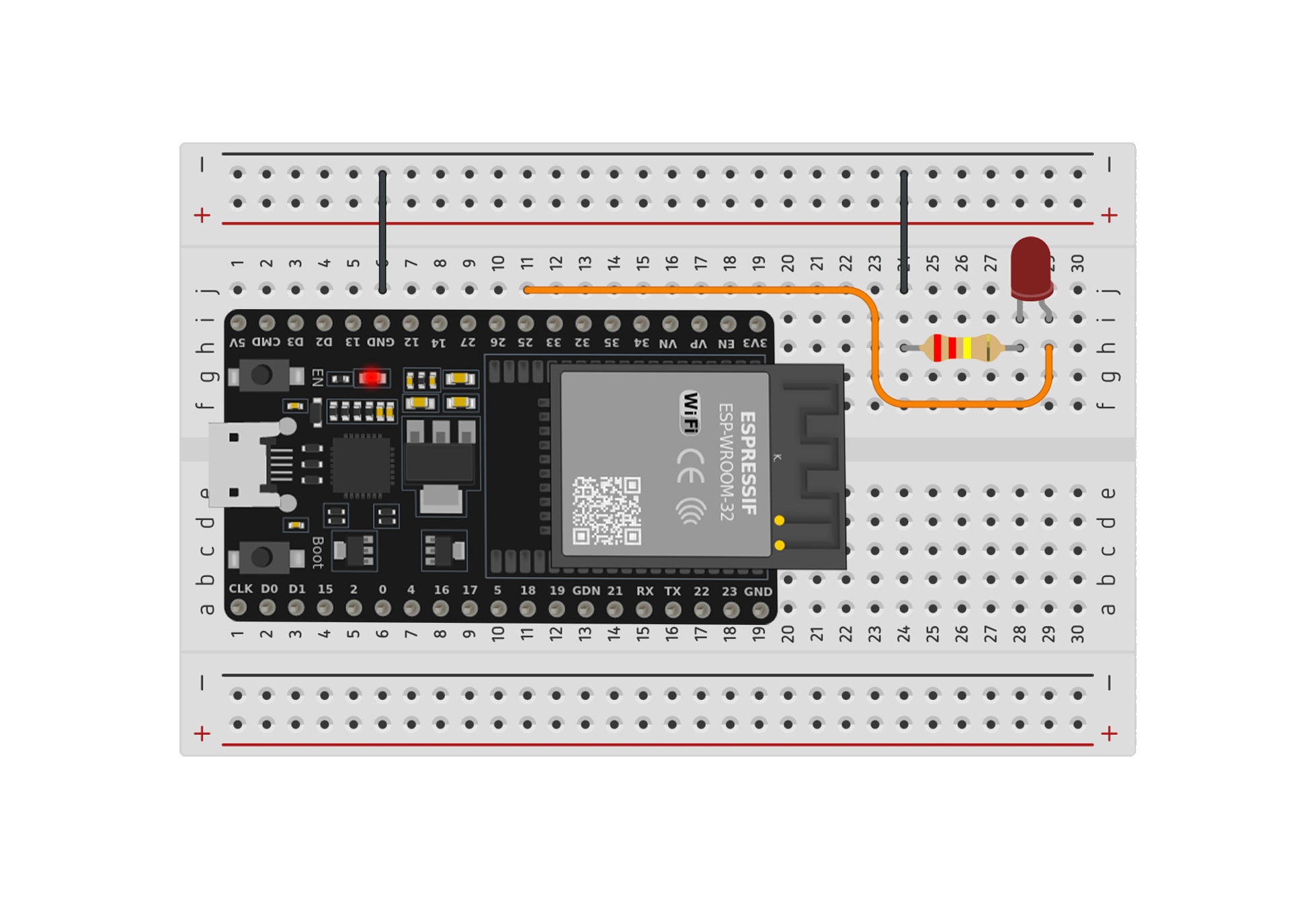
Code Solutions
- main.cpp
- header.h
#include <Arduino.h>
#include <WiFi.h>
#include "html.h"

#define LED_PIN 5

const char* WIFI_SSID = "ESP32-WebServer";          // Defining WiFi password
const char* WIFI_PASSWORD = "SECUREPASSWORD123";    // Defining WiFi password
const int SERVER_PORT = 80;                         // Defining Web server Port

WebServer server(SERVER_PORT);                      // Initializing web server on predetermined PORT

void initializeWebServer() {
    WiFi.softAP(WIFI_SSID, WIFI_PASSWORD);                                              // Starting WiFi access point
    Serial.println("Access point started with the following IP: " + WiFi.softAPIP());   // Printing web server IP address
    Serial.println("Webserver PORT: " + SERVER_PORT);                                   // Printing web server port

    // Registering interaction
    server.on("/", HTTP_GET, []() {
        server.send(200, "text/plain", htmlPage);      // Serving HTML page
    });

    // Registering interaction
    server.on("/toggle", HTTP_GET, []() {
        digitalWrite(LED_PIN, !digitalRead(LED_PIN));   // Flipping LED state
        server.send(200, "text/plain", "Toggled");      // Sending GET response
    });

    server.begin();             // Starting web server
}

void setup() {
    Serial.begin(115200);       // Starting serial with a baud rate of 115200

    pinMode(LED_PIN, OUTPUT);   // Setting pin mode of LED pin to output

    initializeWebServer();      // Calling initialize web server method
}

void loop() {
    server.handleClient();      // Running server handler
}
#ifndef Html_h
#define Html_h

const char* htmlPage =
"<!DOCTYPE html>"
"<html>"
"<head>"
"<title>ESP32 LED Toggle</title>"
"<style>"
"html, body {"
    "height: 100%;"
    "margin: 0;"
    "display: flex;"
    "justify-content: center;"
    "align-items: center;"
    "background-color: #121212;"
"}"
"button {"
    "padding: 20px 40px;"
    "font-size: 24px;"
    "cursor: pointer;"
    "text-align: center;"
    "outline: none;"
    "color: #fff;"
    "background-color: #333333;"
    "border: none;"
    "border-radius: 15px;"
    "box-shadow: 0 5px #666;"
"}"
"button:hover {"
    "background-color: #555555;"
"}"
"button:active {"
    "background-color: #555555;"
    "box-shadow: 0 3px #444;"
    "transform: translateY(4px);"
"}"
"</style>"
"</head>"
"<body>"
"<button onclick=\"toggleLED()\">Toggle LED</button>"
"<script>"
"function toggleLED() {"
    "var xhr = new XMLHttpRequest();"
    "xhr.open('GET', '/toggle', true);"
    "xhr.send();"
"}"
"</script>"
"</body>"
"</html>";

#endif
If you are writing HTML for an embedded web server, a lot of examples online just store the HTML code as a string as main.cpp. This can get very messy very quick. A neater way of going about it is storing the HTML code in a string variable within a header file (As shown in this example). If you are new to header files and find this confusing, refer to the header files section in the programming chapter of this resource.